Introducing Wharfmap: A Docker Compose Visualization Extension for VS Code
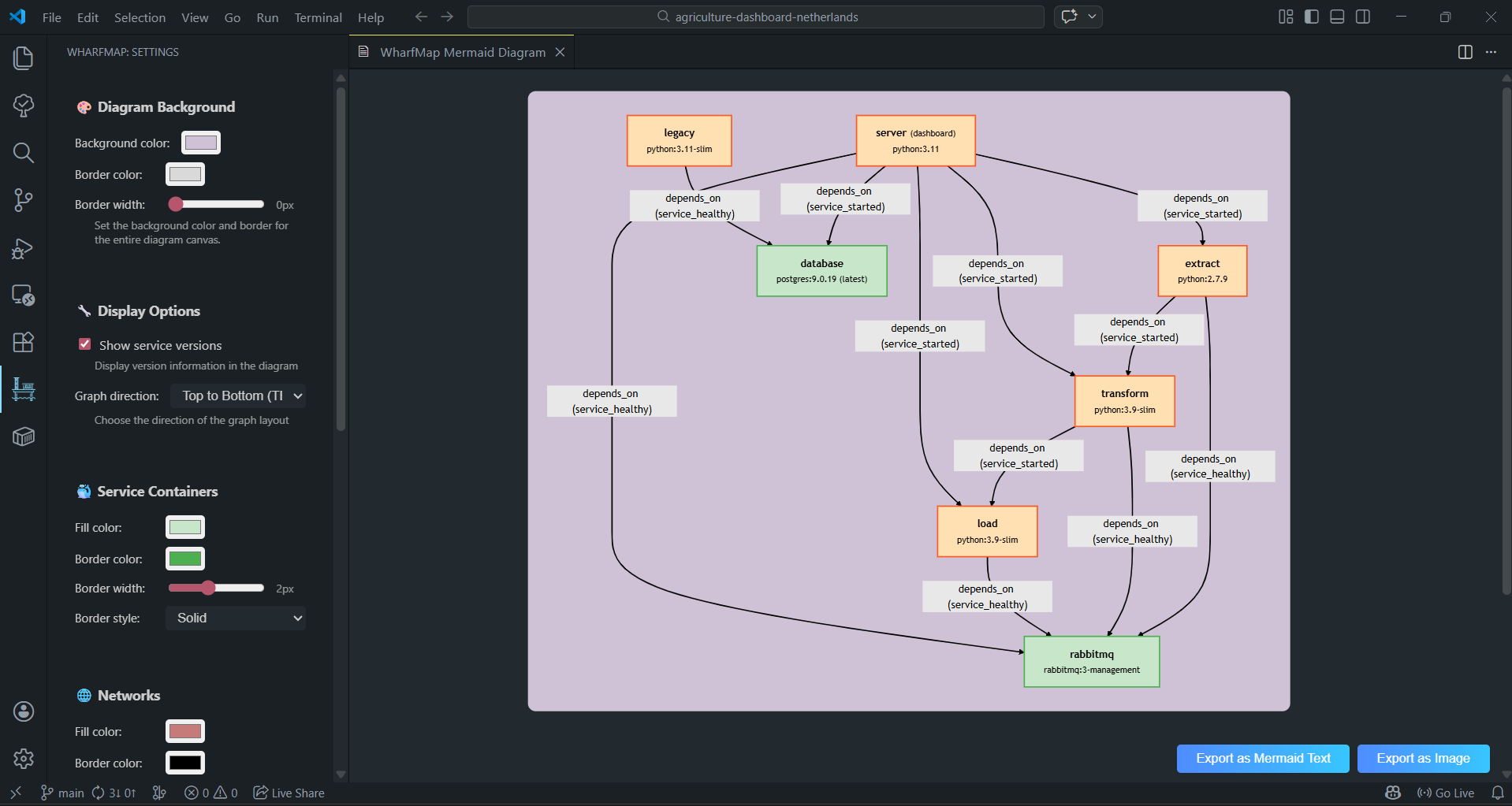
As a developer working with complex Docker Compose setups, I often found myself struggling to visualize the relationships between services, dependencies, and networks in my projects. This personal frustration led me to create Wharfmap, a VS Code extension designed to make Docker Compose files more understandable and manageable.
Why Wharfmap?
Docker Compose files can become quite convoluted, especially in larger projects with multiple services, dependencies, and networks. Wharfmap addresses this by providing a clear visual representation of your compose setup. A special shoutout goes to a Reddit user who suggested including service versions in the visualization – that feature has been incredibly helpful!
Key Features
Wharfmap offers several powerful features to enhance your Docker Compose workflow:
- Service Visualization: See all your services at a glance, including their dependencies (like
depends_onrelationships) - Network Mapping: Visualize how services are connected through networks
- Mermaid Integration: Uses Mermaid markdown for clean, professional diagrams
- Export Options: Export your visualization as an SVG image or raw Mermaid markdown
- Customizable Styling: Personalize the appearance of your diagrams to match your preferences
- Version Display: Easily see which version of each service is being used
Installation
Installing Wharfmap is straightforward. You can find it in the VS Code marketplace:
- Open VS Code
- Go to the Extensions view (Ctrl+Shift+X)
- Search for “Wharfmap”
- Click Install
Alternatively, you can install it directly from the command line:
1
code --install-extension mbofos01.wharfmap-extension
How to Use
Once installed, using Wharfmap is straightforward:
- Open a
docker-compose.ymlor similar YAML file in VS Code - Click the “Visualize with Wharfmap” button that appears at the top of the editor
- Alternatively, right-click in the YAML file and select “Visualize with Wharfmap”
- The visualization will display your services, dependencies, and networks using Mermaid diagrams
- Use the side panel to customize settings like default colors and whether to show service versions
- Export your diagram as an SVG image or raw Mermaid markdown when ready
 Figure 1: Visualization of a Docker Compose file using Wharfmap
Conclusion
Wharfmap has significantly improved my workflow when dealing with Docker Compose files. I hope it helps other developers navigate complex container setups with ease. If you find it useful, please consider leaving a review on the VS Code marketplace!
For more information, check out the VS Code Marketplace page.